So, you’ve finally decided to get a website. Or maybe you’ve got one already and it’s… fine. But you’re wondering if there’s something better out there.
Either way, you’re staring at a dizzying menu of options: WordPress, Wix, Squarespace, Shopify, Weebly, Webflow, and about a hundred others. Every one of them claims to be the best. Every one of them has a slick commercial. And every one of them will take your money.
So which one is actually right for you?
Spoiler alert: there’s no single right answer. It depends on what kind of business you run, how much time you want to spend, and what you actually need your website to do.
Let’s cut through the noise.
The Big Question: What Do You Actually Need?
Before we talk about platforms, let’s talk about you. Grab a piece of paper, or open a note on your phone, and answer these three questions:
1. What’s your primary goal?
- Are you selling products online? (E-commerce)
- Are you booking appointments? (Service-based)
- Are you just providing information? (Brochure site)
2. How much time do you want to spend?
- Do you enjoy tinkering with design and features? (DIY)
- Do you want to set it and forget it? (Hands-off)
- Are you somewhere in the middle?
3. What’s your budget?
- Are you looking for cheap? (Under $200/year)
- Are you looking for affordable but capable? ($200–$500/year)
- Are you willing to invest more for custom features? ($500+/year)
Be honest with yourself. There’s no wrong answer, but your answers will point you in the right direction.
The Contenders: A Quick Breakdown
Let’s look at the most common platforms and what they’re actually good for.
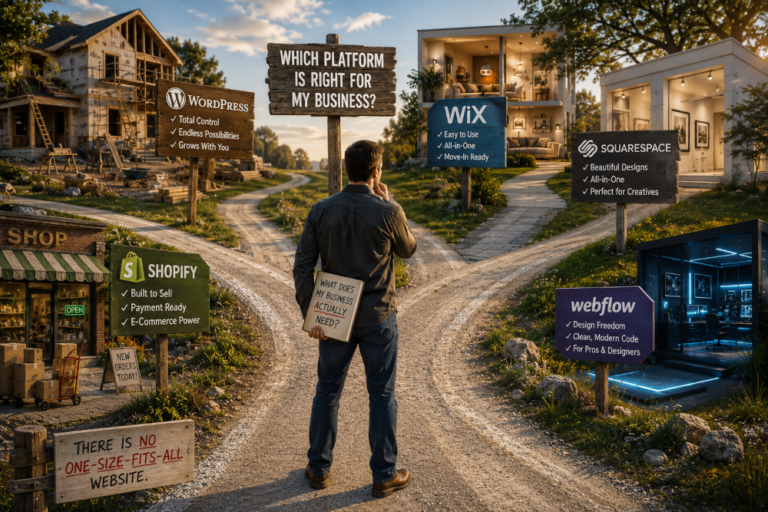
WordPress.org (The Heavyweight)
Best for: Businesses that want total control and room to grow.
Pros:
- You own everything. Your content, your design, your data.
- Thousands of plugins for any feature you can imagine.
- Scales with your business, from a simple blog to a massive online store.
- Great for SEO (with the right setup).
Cons:
- Steeper learning curve. You’ll need to get comfortable with updates and plugins.
- Hosting and security are your responsibility.
- Can get expensive if you hire a developer for custom work.
The bottom line: WordPress is like buying a fixer-upper house. It takes work, but you get exactly what you want and you own it outright.
A quick warning: There are two WordPresses. WordPress.org is the real, open-source, self-hosted platform I’m recommending here. WordPress.com is a separate, paid hosting service that limits what you can do unless you pay extra. They’re not the same thing. If someone tries to sell you WordPress.com, run the other way.
Wix (The All-in-One)
Best for: Beginners who want everything in one place and don’t want to think about hosting.
Pros:
- Drag-and-drop builder. Very easy to use.
- Hosting included. No separate bills.
- Lots of templates (though they can look similar).
Cons:
- You’re renting, not owning. Move to another platform and you start from scratch.
- Can get slow with too many features.
- Less flexibility for advanced SEO or custom features.
The bottom line: Wix is like renting a furnished apartment. Move-in ready, but you’re stuck with the furniture.
Squarespace (The Designer’s Choice)
Best for: Creative businesses like photographers, artists, designers, who care about aesthetics.
Pros:
- Beautiful, modern templates.
- Everything included (hosting, SSL certificate for security).
- Good for portfolios and simple e-commerce.
Cons:
- Less flexible than WordPress.
- Can be tricky to customize beyond the template.
- E-commerce features are limited for larger stores.
The bottom line: Squarespace is like buying a designer outfit. It looks great, but it’s not for everyone.
Shopify (The E-Commerce King)
Best for: Businesses that exist primarily to sell products online.
Pros:
- Built for e-commerce. Everything is optimized for sales.
- Payment processing included.
- Unlimited products and powerful inventory management.
Cons:
- Monthly fees add up (plus transaction fees).
- Limited content features – blogging is an afterthought.
- Harder to customize without hiring a developer.
The bottom line: Shopify is a specialized tool. If you’re not selling products, you probably don’t need it.
Webflow (The Designer’s Dream)
Best for: Designers and developers who want granular control without coding.
Pros:
- Incredible design flexibility.
- Clean, modern code.
- Good for complex, custom sites.
Cons:
- Steep learning curve. Not beginner-friendly.
- Pricing gets complicated.
- Overkill for most small businesses.
The bottom line: Webflow is like a professional kitchen. Amazing if you know what you’re doing. Intimidating if you don’t.
The Honest Recommendation
Here’s where I earn my keep: for most small businesses, I recommend starting with WordPress.
Here’s why:
- You own it. It’s yours forever. No platform can hold your content hostage.
- It grows with you. Start small, add features later. No need to switch platforms when you outgrow them.
- It’s everywhere. Most hosts support it. Most developers know it. You’re never stuck.
But, and this is a big but, only if you’re willing to learn a little. WordPress requires maintenance. Updates. Backups. Security. If you’re not willing to do that (or pay someone to do it), then Wix or Squarespace might be the better fit.
A Quick Word on Switching
You might already have a website on one of these platforms and be thinking about switching. Fair warning: it’s not always easy.
Moving content from Wix to WordPress is like moving furniture out of a rental. It’s doable, but it’s a hassle. And you’ll likely lose some formatting or SEO in the process.
If you’re happy with what you have, stay. If you’ve outgrown it, make the switch, but budget time and money for the move.
The Bottom Line
The best platform is the one that fits your business, your skills, and your budget.
- WordPress: You want control and you’re willing to learn.
- Wix: You want simplicity and you don’t care about owning.
- Squarespace: You’re creative and you care about design.
- Shopify: You’re selling products online.
- Webflow: You’re a designer and you want total control.
There’s no shame in any of these choices. The only wrong choice is doing nothing at all.
This is part of our ongoing series on building a strong online presence. Check out our post on DIY or hire a pro? and our guide to choosing a domain name.